Why AI Chatbots Give Wrong Answers, and How to Stop Yours
The fear that stops most business owners from putting a chatbot on their website is a simple one: that it will tell a customer something that is not true. The fear is justified, because AI chatbots give wrong answers for reasons that are well understood, and this post explains those reasons, shows how an assistant built only from your own documents avoids them, and lists what to check before you let one talk to your customers.
The three reasons AI chatbots give wrong answers
The first reason is that the chatbot was never told the truth about your business. A general chatbot draws on what it learned from the internet at large, and when a visitor asks about your delivery charge or your cancellation policy, it produces a plausible answer built from other businesses' pages. It has no way of knowing that yours is different, and it does not say that it does not know. The answer sounds confident and is simply made up.
The second reason is that the material behind the chatbot is out of date. Prices change, hours change, a service is dropped, and the document that describes it is not. A chatbot answers from what it has, so it keeps quoting last year's price with the same confidence as this year's. The mistake belongs to the process that keeps the documents current, not to the chatbot, but the customer does not see the difference.
The third reason is that the material contradicts itself. A price list from March and a brochure from June give two prices for the same service, and the chatbot picks one. A policy page says fourteen days and an email template says thirty. Nobody noticed, because no person reads every document at once. A chatbot does, and the contradiction surfaces in front of a customer.
How an assistant built from your documents avoids them
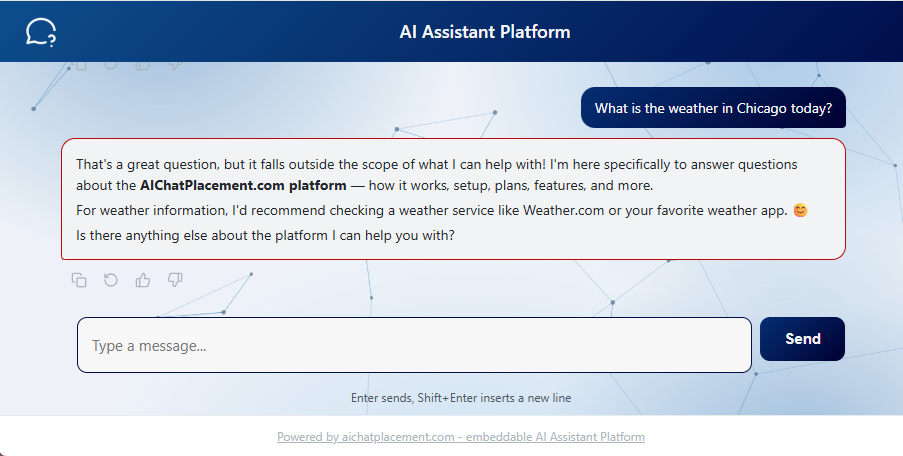
An assistant on our platform is allowed one source of knowledge: the documents you upload. It does not draw on the open internet, and it does not fill gaps with general knowledge. When a visitor asks something your documents cover, the answer comes from your own words. When a visitor asks something they do not cover, the assistant says so rather than inventing an answer. That single rule removes the first cause of wrong answers, and it is why you can put the assistant in front of customers at all.
The second cause, out-of-date material, becomes a small task instead of a hidden risk. When a price or a policy changes, you replace the document and rebuild the knowledge base, which takes minutes, and every answer changes with it. There is nothing to retrain and nobody to inform.
The third cause, contradiction, is something the assistant helps you find. Every conversation is kept in a log you can read, with the question and the answer. An answer that surprises you points at the document that caused it, and once the two versions are reconciled the surprise does not come back.
What to check before you go live
Ask the assistant the five questions your customers ask most, and read each answer next to the document it should have come from. If an answer is wrong, the fix is in the document, not in the assistant: state the fact plainly, in one place, and rebuild.
Ask it something your documents do not cover, such as a service you do not offer, and confirm that it says it does not know rather than guessing. That is the behavior that protects you, and it is worth seeing once with your own eyes.
Check the documents themselves for the two failures above. Look for the same fact stated in two places with two values, and remove one. Look for anything with a date on it that has passed. And make sure each document contains real text: a scanned page is a picture of words, and the assistant cannot read a picture, so a scanned price list produces an assistant that knows no prices.
Finally, write each fact plainly. The assistant answers from the parts of your documents that match the question, so a price that sits in its own clear sentence is found every time, while a price buried in the middle of a long paragraph about something else may not be. Short paragraphs, one fact each, give the best answers.
When it still gets something wrong
It will happen occasionally, and the log is where you find it. Read the conversations for a few minutes each week, note any answer you would have given differently, and trace it to its document. In our experience the cause is nearly always one of the three above: the fact was not in the documents, it was out of date, or it was stated twice. Fix the document, rebuild, and ask the question again.
This is also how the assistant improves over time. The questions visitors ask that your documents do not answer are a list of what to write next, and each addition makes the next wrong answer less likely.
Where to start
Our guide to building a knowledge base from your documents covers what to upload and how to check it. The how it works page shows the whole process in three steps, and the demo page lets you ask an assistant anything about the platform, including things it does not know, so you can see how it answers. When you are ready, the pricing page has the plans.